Webhooks
Receive events from Akahu Apply as applications, documents, and reports change
Akahu Apply can send you a webhook when something changes in your organisation, such as a document finishing processing or a report becoming available.
Webhooks are available to organisations that have Akahu Apply API access enabled, and can only be managed by users with the “admin” role.
Creating a webhook endpoint
Webhook endpoints are managed in the Akahu Apply web portal.
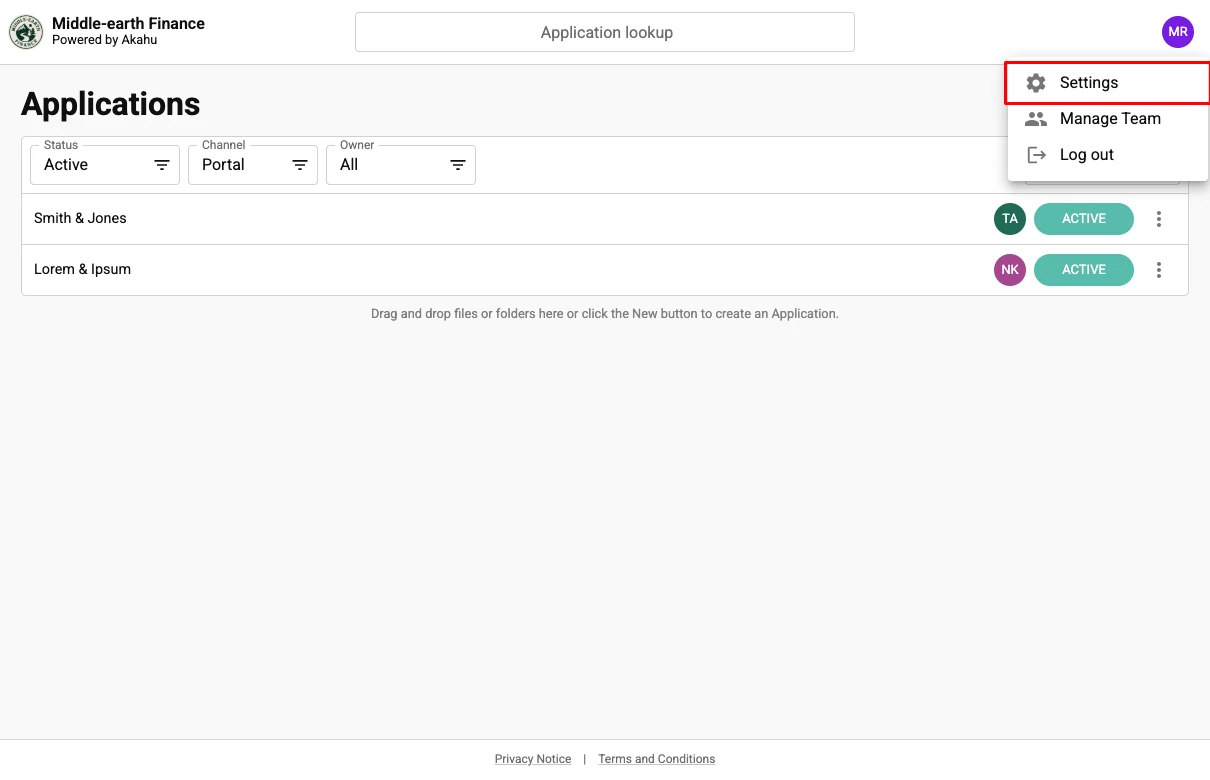
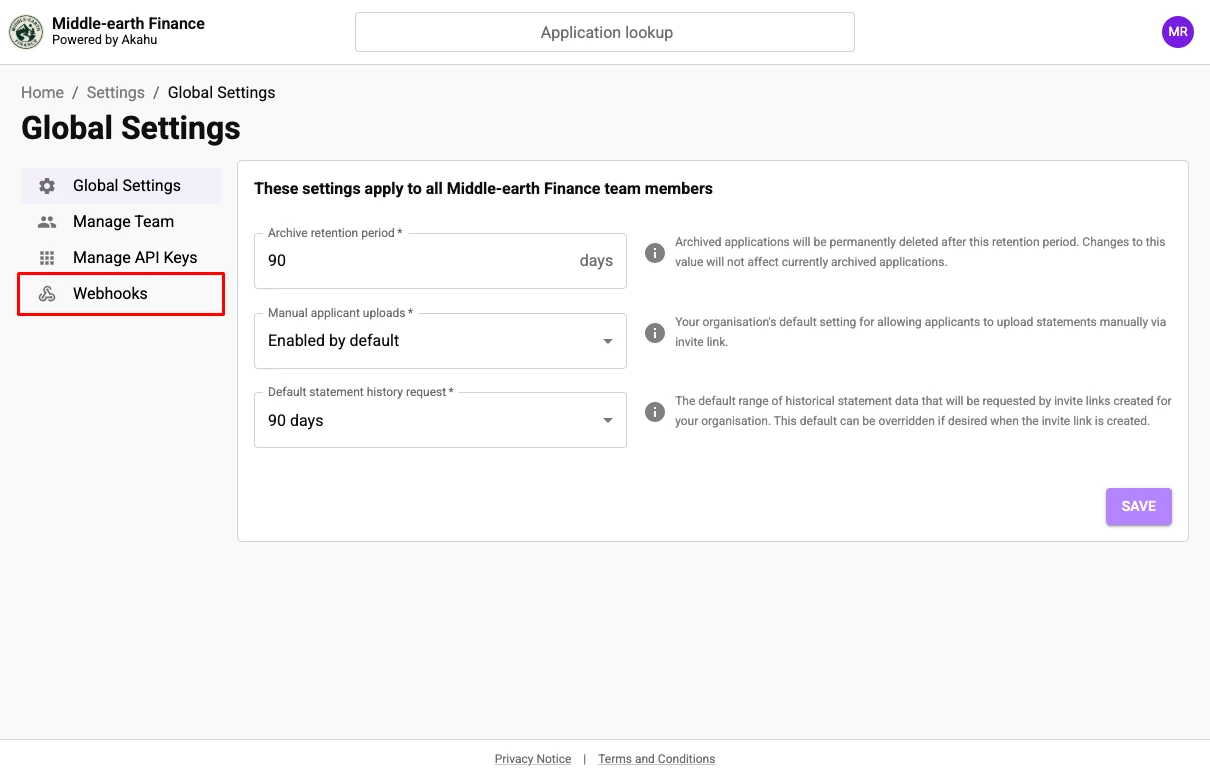
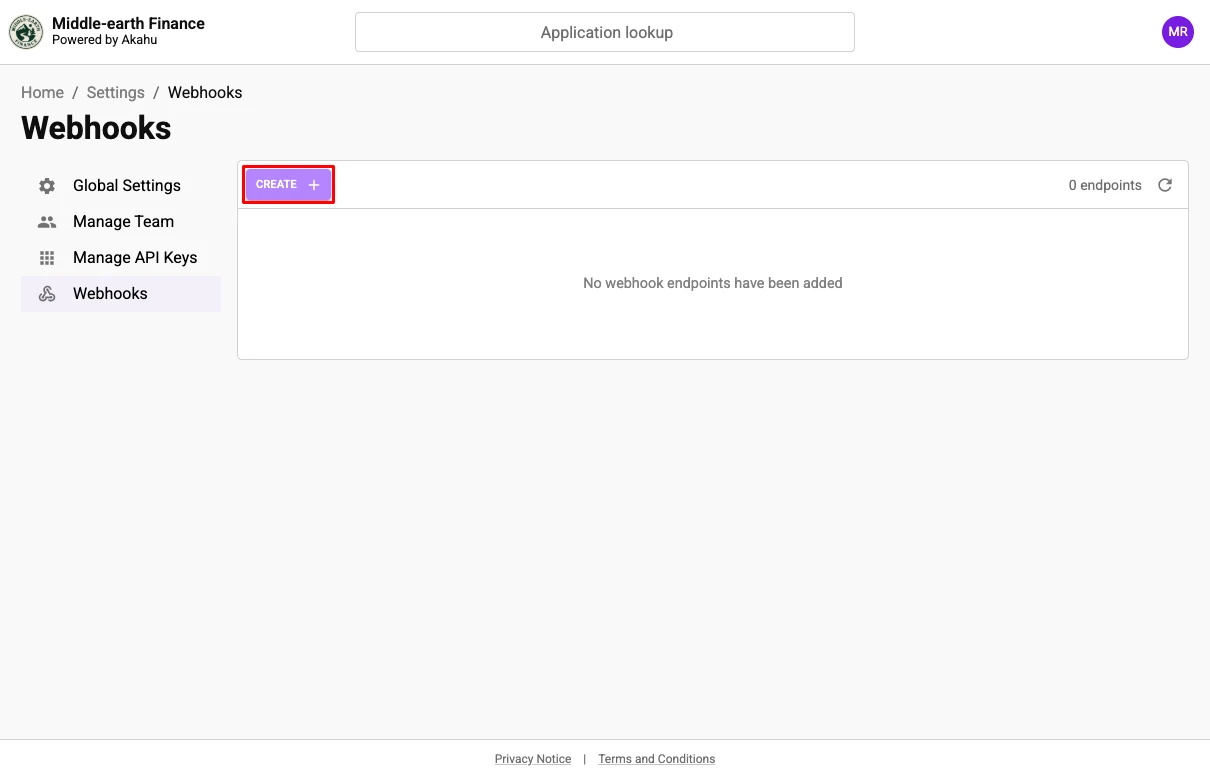
1. Open your webhook settings
Log in to Akahu Apply as a user with the “admin” role and navigate to Settings > Webhooks.
 |  |
2. Add an endpoint
Click “Create”, then in the “Add webhook endpoint” dialog enter a name and the URL that events will be delivered to.
The URL must be publicly reachable over HTTPS on the default port, and must use a hostname rather than an IP address.
 | 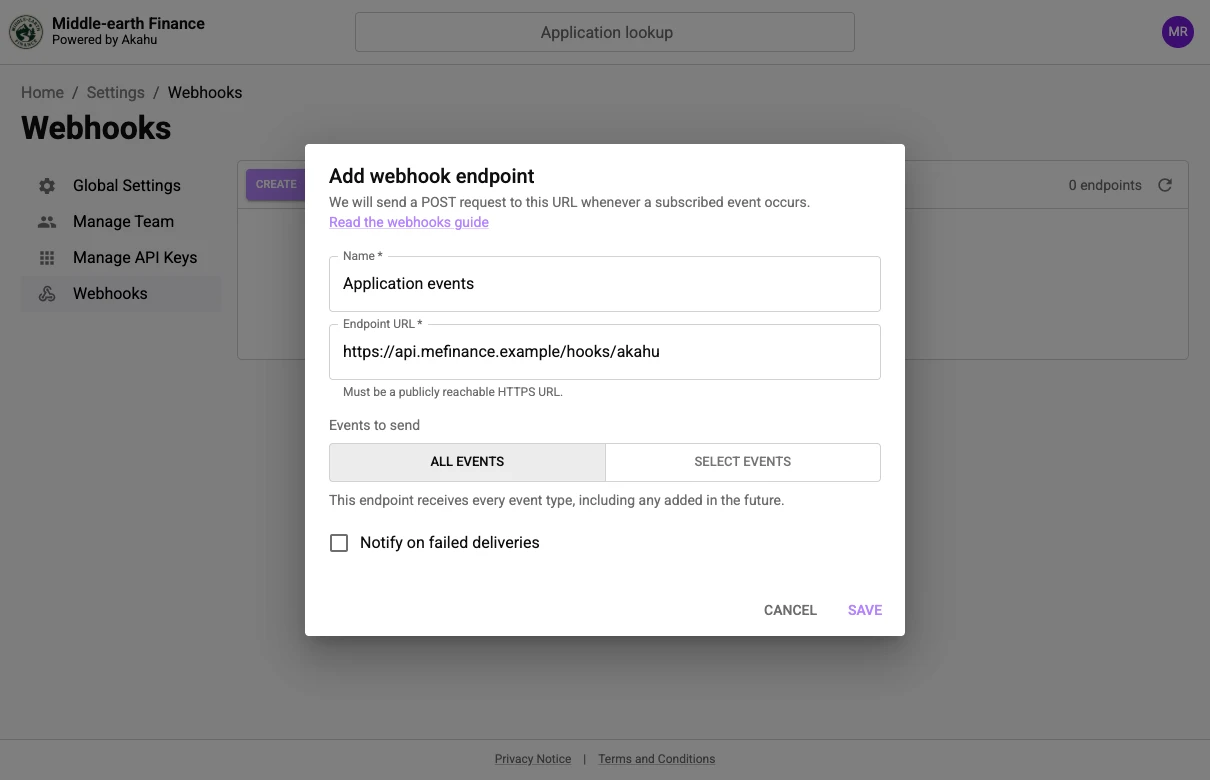 |
Each organisation can register up to five endpoints, and no two endpoints can share the same URL.
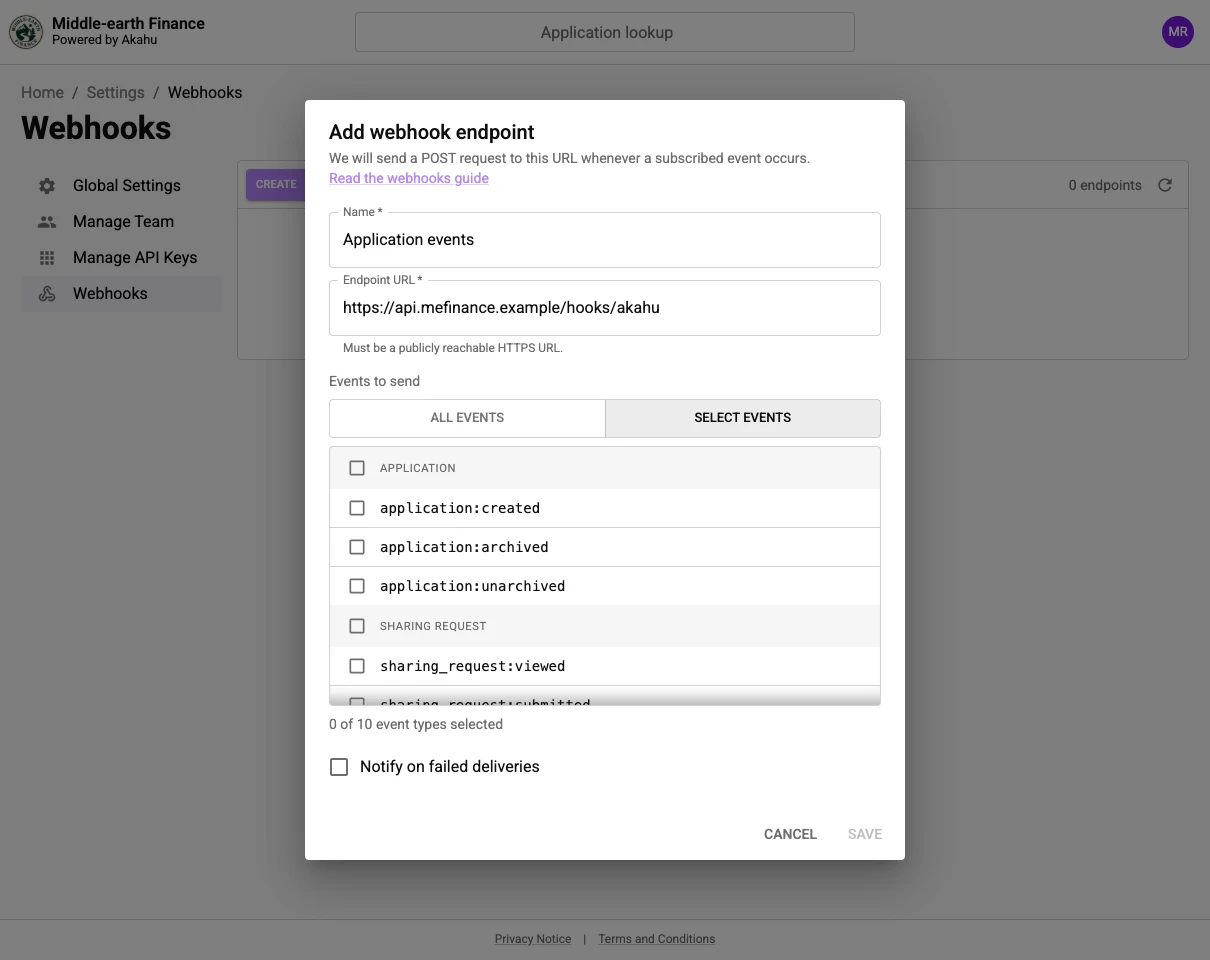
3. Choose the events to receive
Selecting “All events” subscribes your endpoint to all event types, including any that are added in future. “Select events” limits the endpoint to receive only the types you choose.
Each endpoint receives events for the whole organisation, including activity from the web portal as well as the API.
 |
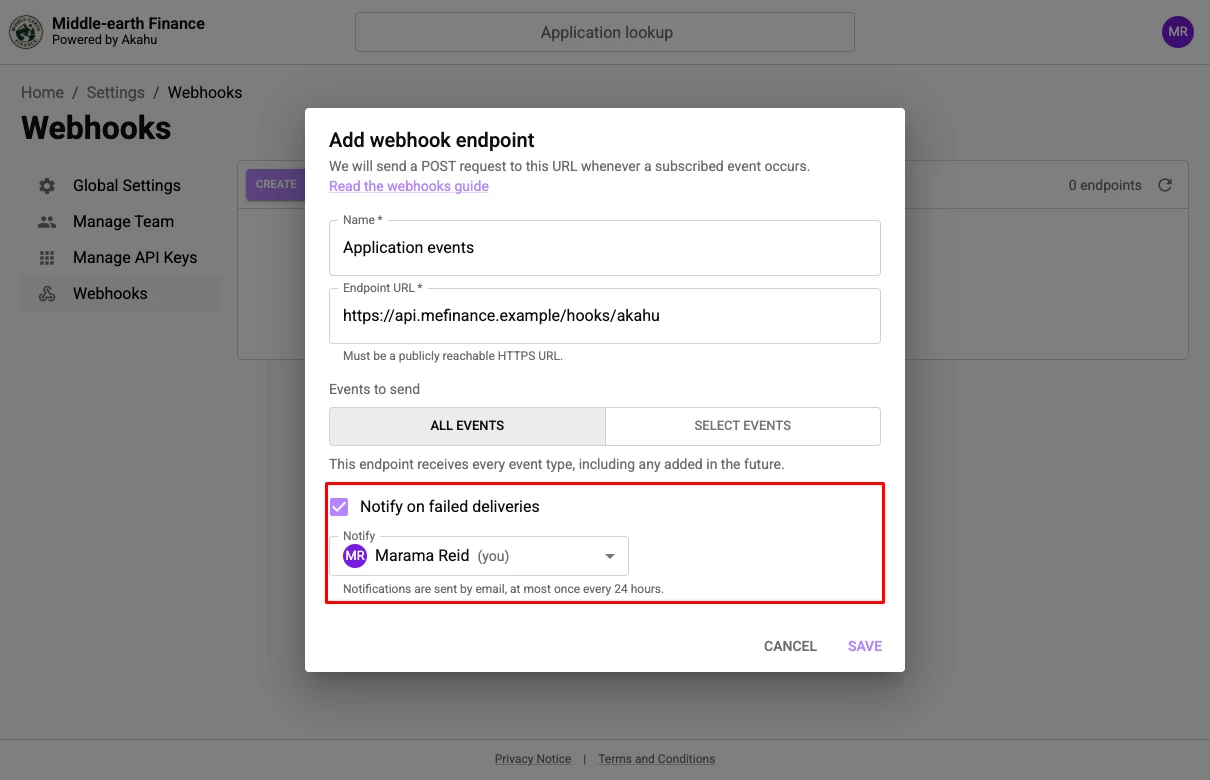
4. Choose whether to be emailed about failures
Enable “Notify on failed deliveries” and choose a member of your organisation. They will be emailed when event delivery fails, and again if the endpoint is disabled due to an extended period of failures. Notification emails are limited to one per endpoint per day, and will be cancelled if the chosen member is removed from your organisation.
 |
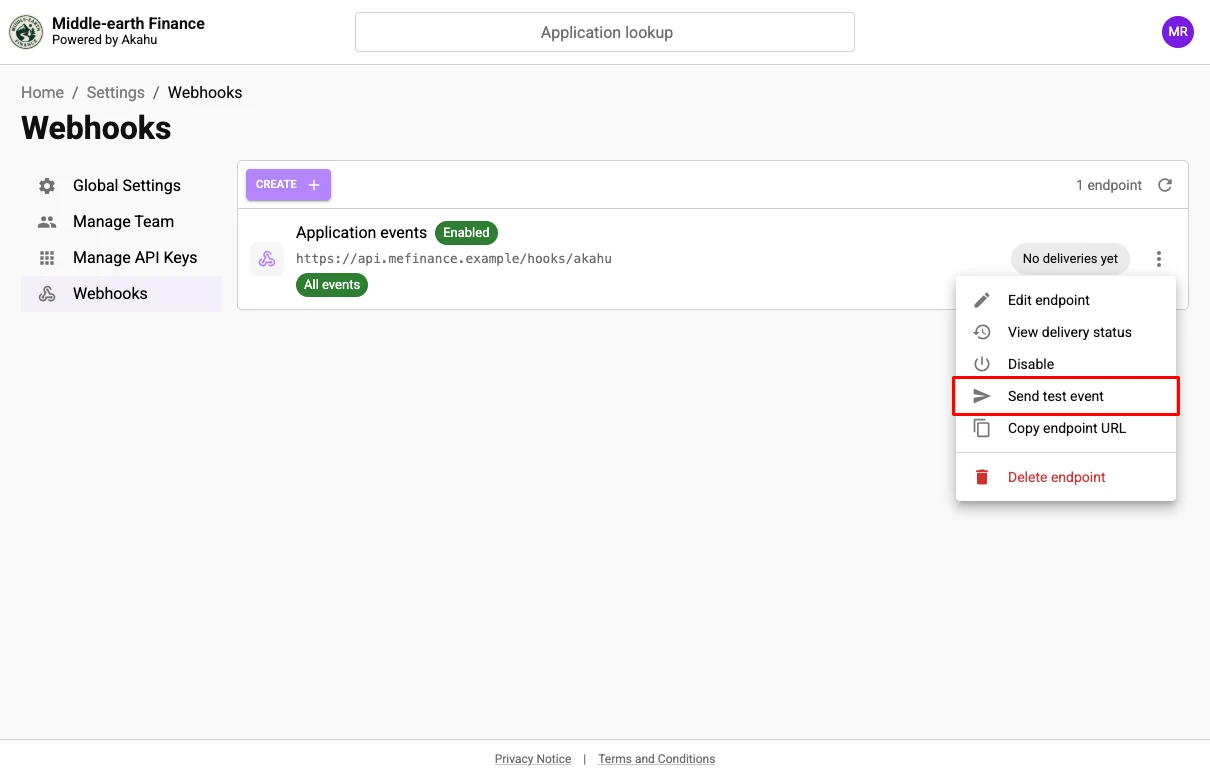
5. Send a test event
Save the endpoint, then choose “Send test event” from its menu to check that your handler is reachable and verifying signatures correctly. A test event has the type test, and is only sent to the endpoint you triggered it from.
 |
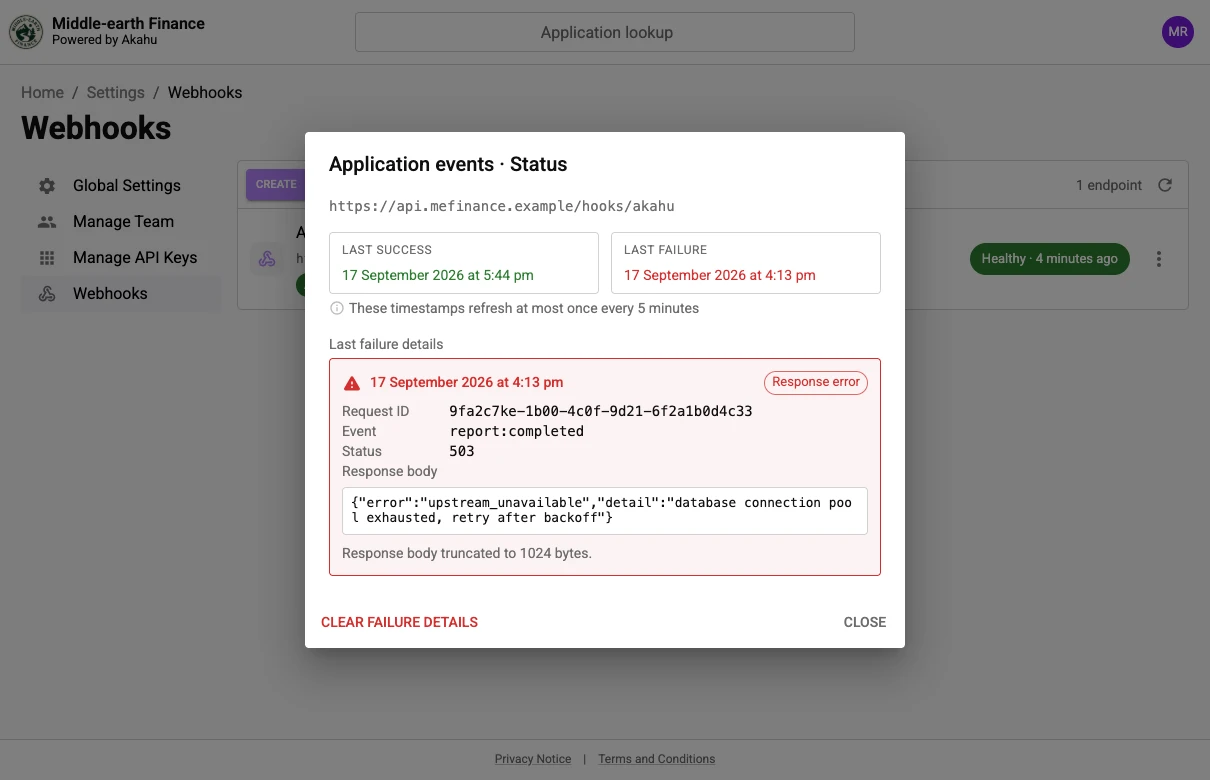
6. Check delivery status
You can view the delivery status for an endpoint by clicking on the status badge or choosing “View delivery status” from the actions menu. If a delivery failure has been recorded, details include the request ID, the response status, and the first 1024 bytes of the response body that your endpoint returned. Failed deliveries will be retried and may succeed at a later time.
 |
What a webhook looks like
Each event is delivered as a POST request with a JSON body:
{
  "_id": "evt_tz4a98xxat96iws9zmbrgj3a",
  "emitted_at": "2026-08-05T02:31:10.482Z",
  "payload": {
    "type": "report:completed",
    "_org": "org_s5l7kht0o1oknb0fl15i31rq",
    "_application": "application_k1qzpjjv7wbidaqj6g4rjtpr",
    "_report": "report_hlyt2oipojdbz8gteqtwmoi7"
  }
}
payload.type identifies the event type. The remaining payload fields vary depending on this value. Full event schemas are documented in our API reference.
Two headers are sent with every request:
| Header | Description |
|---|---|
X-Akahu-Apply-Signature | A detached JWS (RFC 7515) over the request body, signed with ES256. See Verifying a webhook. |
X-Akahu-Apply-Request-Id | Unique per delivery attempt, including retries. If you need to query a delivery issue with the Akahu team, please include the request ID to assist with troubleshooting. |
Your endpoint must return a 2xx status within 10 seconds. If your handler returns a non 2xx status code or takes longer than 10 seconds to respond, the delivery will be marked as a failure and retried.
If your application needs to perform meaningful work in response to a webhook event, it is best practice to queue the event for background processing and respond to the request immediately. This will ensure that your deliveries don't time out.
Events
Every event type and its associated schema is listed under Webhooks in our API reference.
New event types may be added over time. An endpoint set to “All events” will start receiving them, so ignore any payload.type that you don't recognise.
Verifying a webhook
The X-Akahu-Apply-Signature header is a detached JWS (RFC 7515 Appendix F) signed with ES256. The payload segment of the serialisation is empty, so verification needs the raw request body exactly as it was received, before any JSON parsing.
Make sure that your application rejects all requests that fail signature validation.
To verify a webhook:
- Read the
kidfrom the protected header, which is the first segment of the signature, base64url encoded JSON. - Fetch the key with that
kidfromhttps://api.apply.akahu.nz/.well-known/jwks.json(the response should be cached by your application1). - Verify the signature over
<protected header>.<base64url of the raw body>using that key, acceptingES256and nothing else.
1The JWKS response should be cached for a maximum of 24 hours. The cached response should be invalidated in the event that the signature contains a new kid, as signing keys are rotated from time to time. During a rotation the JWKS endpoint will include both keys.
Most JOSE libraries can verify the signature once the body is reattached. Examples using Node.js, Python, Java, and C# are supplied below.
// requires jose: npm install jose
import { createRemoteJWKSet, flattenedVerify } from "jose";

const jwks = createRemoteJWKSet(
  new URL("https://api.apply.akahu.nz/.well-known/jwks.json"),
  { cacheMaxAge: 12 * 60 * 60 * 1000 } // 12 hours
);

/**
 * Check whether a webhook was signed by Akahu Apply.
 *
 * @param {string} signature - the value of the "X-Akahu-Apply-Signature" header
 * @param {Buffer} body - the raw request body, before any parsing
 * @returns {Promise<boolean>} whether the signature is valid
 */
async function verifyWebhook(signature, body) {
  const [protectedHeader, , sig] = signature.split(".");

  try {
    await flattenedVerify(
      {
        protected: protectedHeader,
        payload: Buffer.from(body).toString("base64url"),
        signature: sig,
      },
      jwks,
      { algorithms: ["ES256"] }
    );
  } catch {
    return false;
  }

  return true;
}
# requires PyJWT: pip install "pyjwt[crypto]"
import base64
from jwt import PyJWKClient, api_jws
jwks = PyJWKClient(
"https://api.apply.akahu.nz/.well-known/jwks.json",
lifespan=12 * 60 * 60, # 12 hours
)
def verify_webhook(signature: str, body: bytes) -> bool:
"""Check whether a webhook was signed by Akahu Apply.
Arguments:
signature -- the value of the "X-Akahu-Apply-Signature" header
body -- the raw request body, before any parsing
"""
try:
protected_header, _, sig = signature.split(".")
payload = base64.urlsafe_b64encode(body).rstrip(b"=").decode()
token = f"{protected_header}.{payload}.{sig}"
kid = api_jws.get_unverified_header(token)["kid"]
key = jwks.get_signing_key(kid).key
api_jws.decode_complete(token, key, algorithms=["ES256"])
except Exception:
return False
return True// requires com.nimbusds:nimbus-jose-jwt
package nz.akahu.apply;
import com.nimbusds.jose.JWSAlgorithm;
import com.nimbusds.jose.JWSObject;
import com.nimbusds.jose.Payload;
import com.nimbusds.jose.crypto.factories.DefaultJWSVerifierFactory;
import com.nimbusds.jose.jwk.source.JWKSource;
import com.nimbusds.jose.jwk.source.JWKSourceBuilder;
import com.nimbusds.jose.proc.JWSVerificationKeySelector;
import com.nimbusds.jose.proc.JWSVerifierFactory;
import com.nimbusds.jose.proc.SecurityContext;
import com.nimbusds.jose.util.Base64URL;
import java.net.URI;
import java.security.Key;
import java.util.List;
import java.util.Set;
import java.util.concurrent.TimeUnit;
public class AkahuApplyWebhook {
private static final Set<JWSAlgorithm> ACCEPTED_ALGORITHMS = Set.of(JWSAlgorithm.ES256);
private static final JWSVerifierFactory VERIFIERS = new DefaultJWSVerifierFactory();
private static final JWKSource<SecurityContext> JWKS = jwks();
// Refetched early when a signature carries a kid the cached set doesn't hold.
private static JWKSource<SecurityContext> jwks() {
try {
return JWKSourceBuilder
.create(URI.create("https://api.apply.akahu.nz/.well-known/jwks.json").toURL())
.cache(TimeUnit.HOURS.toMillis(12), JWKSourceBuilder.DEFAULT_CACHE_REFRESH_TIMEOUT)
.build();
} catch (Exception error) {
throw new IllegalStateException(error);
}
}
/**
* Check whether a webhook was signed by Akahu Apply.
*
* @param signature the value of the "X-Akahu-Apply-Signature" header
* @param body the raw request body, before any parsing
* @return whether the signature is valid
*/
public static boolean verifyWebhook(String signature, byte[] body) {
try {
String[] parts = signature.split("\\.", -1);
JWSObject jws = new JWSObject(
new Base64URL(parts[0]), new Payload(body), new Base64URL(parts[2]));
// No keys are returned if the header declares an algorithm we don't accept.
List<Key> keys = new JWSVerificationKeySelector<>(ACCEPTED_ALGORITHMS, JWKS)
.selectJWSKeys(jws.getHeader(), null);
for (Key key : keys) {
// The verifier is chosen from the header, so a new algorithm only needs
// adding to ACCEPTED_ALGORITHMS.
if (jws.verify(VERIFIERS.createJWSVerifier(jws.getHeader(), key))) {
return true;
}
}
} catch (Exception error) {
// A malformed signature, or a JWKS that couldn't be fetched.
}
return false;
}
}// requires Microsoft.IdentityModel.JsonWebTokens
using Microsoft.IdentityModel.JsonWebTokens;
using Microsoft.IdentityModel.Tokens;
public static class AkahuApplyWebhook
{
private static readonly HttpClient Http = new();
private static readonly SemaphoreSlim JwksLock = new(1, 1);
private static readonly TimeSpan JwksLifetime = TimeSpan.FromHours(12);
private static readonly TimeSpan UnknownKidCooldown = TimeSpan.FromSeconds(30);
private static JsonWebKeySet? jwks;
private static DateTimeOffset jwksFetchedAt;
// Cached for 12 hours, and refetched early when a signature carries a kid the cached
// set doesn't hold. The cooldown stops a stream of made-up kids refetching every time.
private static async Task<JsonWebKeySet> GetJwksAsync(string kid)
{
await JwksLock.WaitAsync();
try
{
var age = DateTimeOffset.UtcNow - jwksFetchedAt;
var holdsKid = jwks?.Keys.Any(key => key.Kid == kid) ?? false;
if (jwks is null || age > JwksLifetime || (!holdsKid && age > UnknownKidCooldown))
{
jwks = JsonWebKeySet.Create(
await Http.GetStringAsync("https://api.apply.akahu.nz/.well-known/jwks.json"));
jwksFetchedAt = DateTimeOffset.UtcNow;
}
return jwks;
}
finally
{
JwksLock.Release();
}
}
/// <summary>Check whether a webhook was signed by Akahu Apply.</summary>
/// <param name="signature">The value of the "X-Akahu-Apply-Signature" header.</param>
/// <param name="body">The raw request body, before any parsing.</param>
/// <returns>Whether the signature is valid.</returns>
public static async Task<bool> VerifyWebhookAsync(string signature, byte[] body)
{
try
{
var parts = signature.Split('.');
var token = $"{parts[0]}.{Base64UrlEncoder.Encode(body)}.{parts[2]}";
var keys = await GetJwksAsync(new JsonWebToken(token).Kid);
var result = await new JsonWebTokenHandler().ValidateTokenAsync(token, new TokenValidationParameters
{
IssuerSigningKeys = keys.GetSigningKeys(),
ValidAlgorithms = ["ES256"],
// The body is not a claims set, so there is nothing but the signature to check.
ValidateIssuer = false,
ValidateAudience = false,
ValidateLifetime = false,
});
return result.IsValid;
}
catch (Exception)
{
// A malformed signature, or a JWKS that couldn't be fetched.
return false;
}
}
}Example data
Below is a real delivery, signed with a key that the JWKS still publishes. Use it to check that your verification accepts the valid signature and rejects the invalid one. The signature covers the body byte for byte, so don't add a trailing newline or reformat it.
{"_id":"evt_tz4a98xxat96iws9zmbrgj3a","emitted_at":"2026-08-05T02:31:10.482Z","payload":{"type":"report:completed","_org":"org_s5l7kht0o1oknb0fl15i31rq","_application":"application_k1qzpjjv7wbidaqj6g4rjtpr","_report":"report_hlyt2oipojdbz8gteqtwmoi7"}}{
"keys": [
{
"kid": "1b7dc11d-3781-4392-9f64-50db65f38987",
"use": "sig",
"alg": "ES256",
"kty": "EC",
"x": "qH_s4lYGP7ym9kheGwI3U5pz01TcMI8QB7PY2o_JP_c",
"y": "jwDHbddXpP0N2J4N8QJ-0ljht-Aki1XsSrckjObivGI",
"crv": "P-256"
}
]
}eyJhbGciOiJFUzI1NiIsImtpZCI6IjFiN2RjMTFkLTM3ODEtNDM5Mi05ZjY0LTUwZGI2NWYzODk4NyJ9..Z1IcrJaqMr2FSUIj7eaxFy4lFfSeDLX3slxhSzpzjcJ_0mkJb8qJL_6u8MrjRVhbcFVXT-5z_XNXObit13gksgeyJhbGciOiJFUzI1NiIsImtpZCI6IjFiN2RjMTFkLTM3ODEtNDM5Mi05ZjY0LTUwZGI2NWYzODk4NyJ9..h21EHzMckSg9zE_mn10z3KpVGrVaZmp7i28AddqLEp0na9WkNizHdyFiMexvfghvf8RoHAtMgSv809pKzzmkSQThe invalid signature carries the same kid as the valid one, but was signed with a different key. Anything that reads the header without verifying the signature over the body will wrongly accept it.
Retries
A delivery attempt fails if the request times out after 10 seconds, the connection fails, or the response status is anything other than 2xx.
A failed event is retried up to 20 times, backing off exponentially with jitter to a maximum of 15 minutes between attempts. After the final attempt, delivery is abandoned and the event cannot be recovered.
If an endpoint goes a month without a successful delivery, the next abandoned event will cause the endpoint to be disabled. No further events are sent until you enable it again from the portal.
Ordering and idempotency
The event _id is stable across delivery attempts. You can use it as an idempotency key to ignore events that you have already handled.
Webhook events are not guaranteed to be received in the same order that they occurred. Use each event's emitted_at timestamp to identify when events are received out of order, and prefer to fetch the current state from the API rather than relying entirely on the event payload.
Updated 26 days ago